Testing GraphQL Queries Using Cypress
Testing whether or not a GraphQL query has been fired in Cypress
- : Changing image and file paths
- : Changing picture and file paths
As part of my continuing testing efforts, I recently came across a problem for which I couldn’t find an easy answer. As such, I thought that I should document my solution here, in the hopes that it saves someone else some trouble.
Normally, I don’t test whether or not a query is made. Instead, I tend to look for the resulting changes in the user interface. However, recently I needed to test a feature of a program where a graphQL call was made, but that resulted in no change to the UI. In my case, I needed to log when a user visited a page for the first time. This required testing two things: first, that the appropriate graphQL call was made the first time they visited, and second, and just as important, verifying that the graphQL call was not made the second (or subsequent) time.
In the rest of this post, I’ll use a very simple example project to demonstrate how both of these can be achieved! If you just want the solution, you can find the complete project at its github page and the testing files there too.
Basic Setup
The initial project we’ll test is quite simple. The backend is an express server which serves graphQL at /graphql. There is only a single query, which returns a list of todos.
import express from "express";
import cors from "cors";
import { graphqlHTTP } from "express-graphql";
import { buildSchema } from "graphql";

const schema = buildSchema(`
type Todo {
	task: String!
	complete: Boolean!
}
type Query {
	todos: [Todo]
}
`);

const root = {
	todos: () => {
		return [
			{
				task: "Finish the first task",
				complete: true,
			},
			{
				task: "Finish the second task",
				complete: false,
			},
			{
				task: "Finish the third task",
				complete: false,
			},
		];
	},
};

const app = express();
app.use(cors({ credentials: true, origin: true }));
app.use(
	"/graphql",
	graphqlHTTP({
		schema,
		rootValue: root,
		graphiql: true,
	})
);
app.listen(4000);
console.log("Running a GraphQL API server at http://localhost:4000/graphql");
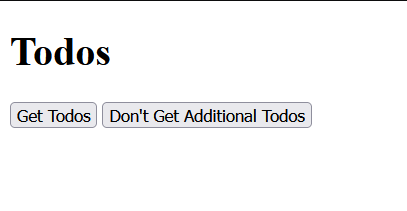
The frontend has a button which fetches and displays the todos, along with another button that does nothing.
First there are no todos.
And then you fetch some.
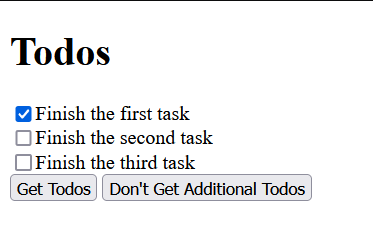
Our goal here will be to write some test tooling to test that the buttons do what they should.
Validating That a GraphQL Call Was Made
In order to validate that a graphQL call was made when we press the button, we are going to use Cypress intercept. The basic syntax that we’ll use is
cy.intercept(url, handler);The issue that we have is that all of our calls are made to the same url: /graphql! This example is a bit contrived, since there is actually only one potential kind of call that we could made (the one that fetches the todos), but normally you’d have lots of different operations to discriminate between. Luckily, there is some help on the Cypress website for dealing with graphQL calls. The basic idea behind what we’ll do is to intercept all graphQL calls, and check each of them for the operationName atribute, which should allow us to discriminate between the different kinds of calls. According to the official graphQL documentation, the operation name is optional but highly recommended, and all client-side graphQL libraries that I’ve used include it. Once we find a query that matches our operation name, we alias that query, allowing us to later use the Cypress wait function to ensure that it was called.
The code for the entire test is here:
// example.cy.js

const aliasGraphqlQuery = (query, operationName, alias) => {
	if (
		query.body.hasOwnProperty("operationName") &&
		query.body.operationName === operationName
	) {
		query.alias = alias;
	}
};

describe("The application", () => {
	beforeEach(() => {
		cy.intercept("/graphql", res => {
			aliasGraphqlQuery(res, "todos", "getTodosQuery");
		});
	});

	it("Should make the graphql call to load the todos when the button is pressed", () => {
		cy.visit("/");
		cy.contains("h1", "Todos").should("exist");
		cy.contains("button", /get todos/i).click();
		cy.wait("@getTodosQuery");
		cy.get("label").its("length").should("be.gt", 0);
	});
});
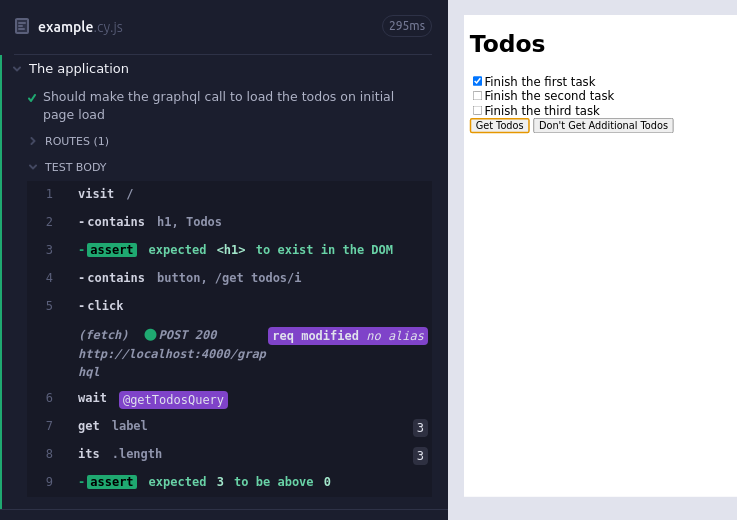
And the result of running it:
Validating That a GraphQL Call Was Not Made
This ends up being much trickier. I found a solution that was very close on StackOverflow which relied on getting all of the interceptions for a particular route, and then testing that the length was 0. This doesn’t quite work in our situation for the simple reason that our alias is not registered until after the query is made. Thus, trying to use get on it fails. Additionally, for the use case that I had in mind, I didn’t want the number of calls to be 0 - I just wanted it to be the same as it was before I navigated there.
The solution that I came up with works by aliasing the entire graphQL query, counting the number of interceptions that match a given criterion (in this case, have the right operationName), taking some sort of action, then counting the number of subsequent calls matching that same filter criterion and asserting that they have the same length.
The updated code (including both tests) is here:
const aliasGraphqlQuery = (query, operationName, alias) => {
	if (
		query.body.hasOwnProperty("operationName") &&
		query.body.operationName === operationName
	) {
		query.alias = alias;
	}
};

/**
 * Function to ensure that no call matching the filter condition is made after an action is performed
 * @param {string} queryAlias - The alias for the query to be checked against
 * @param {function} filter - A filter function which takes an interception as an argument
 * @param {function} action - A function which should perform some sort of action which should *not* cause a graphql call matching the filter condition
 * @param {number} timeout - the number of milliseconds to wait after taking the action for the call to be made
 */
const ensureQueryNotMadeAfterAction = (
	queryAlias,
	filter,
	action,
	timeout = 500
) => {
	const allAlias = `${queryAlias}.all`;
	let numCalls;
	// get the initial number of matching calls
	cy.get(allAlias).then(interceptions => {
		numCalls = interceptions.filter(filter).length;
	});

	// take some action and wait to give time for the call to be made
	action();
	cy.wait(timeout);

	// now check that the number of matching calls hasn't changed
	cy.get(allAlias).then(interceptions => {
		expect(interceptions.filter(filter).length).to.eq(numCalls);
	});
};
describe("The application", () => {
	beforeEach(() => {
		cy.intercept("/graphql", res => {
			aliasGraphqlQuery(res, "todos", "getTodosQuery");
		}).as("graphql");
	});
	it("Should make the graphql call to load the todos when the button is pressed", () => {
		cy.visit("/");
		cy.contains("h1", "Todos").should("exist");
		cy.contains("button", /get todos/i).click();
		cy.wait("@getTodosQuery");
		cy.get("label").its("length").should("be.gt", 0);
	});
	it("Should not make a graphql call when the broken button is clicked", () => {
		cy.visit("/");
		cy.contains("h1", "Todos").should("exist");

		// we care about the 'todo' operation
		const filter = interception =>
			interception.request.body.operationName === "todo";
		// the action that shouldn't trigger the query is clicking the broken button
		const action = () =>
			cy.contains("button", /don't get additional todos/i).click();
		ensureQueryNotMadeAfterAction("@graphql", filter, action);
	});
});
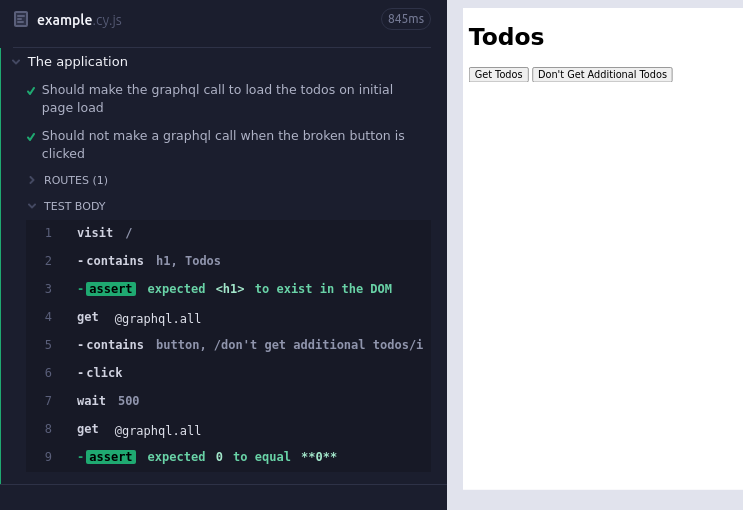
And the result of running the test is here:
Conclusion
Using the functions and methods displayed above, we can now test whether or not specific graphQL calls were made. Although I’ve only just started to use them, I’ve already found them incredibly useful. One advantage which I didn’t expect is that because of the flexibility of the matching, I don’t need to just test that a call with the right operation name wasn’t made - I can test on any condition! For instance, I can check that no call with a particular set of variables was made (e.g. complete vs. incomplete submissions). I’ve also found that using cy.wait in conjunction with aliasing the right graphQL alias has helped to reduce the amount of test flake and helped with error messages, since the timeout for waiting on network calls is quite long and I can also tell right away whether the issue is with the network call itself (e.g. my backend is failing) or with the subsequent UI changes that should occur.
Hopefully this helps you if you have run into the same sort of issue!